One Page UI Style Guide
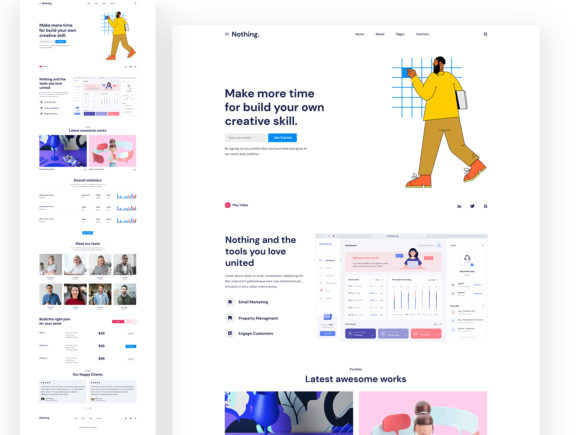
The One Page UI Style Guide is a powerful tool designed for professionals and creatives who want to streamline their design process. This template focuses on the essentials, eliminating unnecessary elements that can complicate workflows and slow down production. It’s ideal for freelancers, small businesses, product sites, landing pages, and agile projects where speed and clarity are key.
By using this style guide, you’ll save time and reduce back-and-forth communication with clients or team members. The clean layout ensures that your design remains focused and easy to navigate, making it an excellent choice for beta projects or rapid prototyping. Whether you're working on a website, print material, or multimedia project, this template provides a solid foundation that's ready to be customized.
Key Features of the One Page UI Style Guide
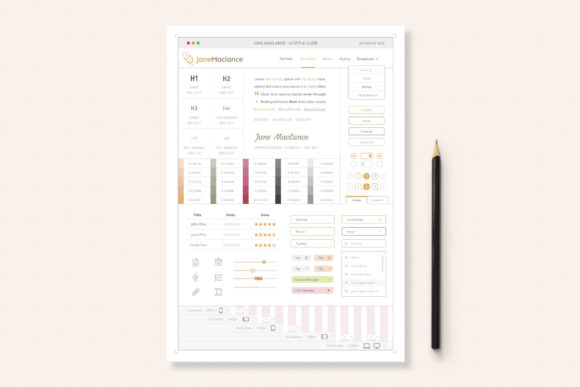
This professional one-page template includes a range of features that make it both functional and visually appealing. The navigation menu mimics a real website, giving you a clear idea of how your final product will look and function. A ready-to-fill color palette allows for quick branding adjustments, while clean system fonts ensure readability across all devices.
The visual columns system helps you understand screen breakpoints, column widths, and gutter sizes at a glance. This makes it easier to create responsive designs that work well on desktops, tablets, and mobile phones. The template is also fully editable, allowing you to adjust text, colors, fonts, and layout without needing advanced technical skills.
Why This Template Stands Out
What sets the One Page UI Style Guide apart is its simplicity and versatility. It’s built on modern UI standards, ensuring that your designs look up-to-date and professional. The included vector files are 100% resizable, so you can use them in any project without losing quality. Plus, the organized layers and proper naming conventions make it easy to edit and manage your work.
The template comes with an original “Copywriter Logo” in vector format, along with original UI elements that add a unique touch to your designs. An info file with links provides additional resources, and there’s even a link for generating custom color palettes. These details make it a comprehensive solution for anyone looking to enhance their design workflow.
Practical Applications Across Industries
This style guide is useful in a wide range of environments. For freelancers, it offers a fast way to present concepts to clients, reducing the need for multiple revisions. Small businesses can use it to create consistent branding across websites, social media, and printed materials. Product sites benefit from its clean layout, which highlights key features without overwhelming users.
Landing pages designed with this template can improve conversion rates by maintaining a focused and user-friendly experience. Agile teams and beta projects appreciate the flexibility it offers, allowing them to iterate quickly without starting from scratch. Educators and students can use it as a learning tool to understand design principles and best practices.
Real-World Use Cases
Imagine you’re a digital marketer tasked with launching a new product. Using the One Page UI Style Guide, you can quickly create a landing page that aligns with your brand’s visual identity. The color palette and font choices help maintain consistency, while the layout ensures that key information is easy to find.
For a small business owner, this template can serve as a blueprint for a website that’s both professional and cost-effective. Instead of hiring a designer, they can customize the template themselves, saving time and money. The same applies to bloggers and publishers who need a clean, responsive design that works across platforms.
Benefits of Using the One Page UI Style Guide
One of the main benefits of this style guide is its impact on usability. A well-structured layout improves user experience by making it easier for visitors to navigate and engage with content. This can lead to higher retention rates and better overall performance for your site or project.
Efficiency is another major advantage. With pre-designed elements and a clear structure, you can focus on the creative aspects of your work rather than spending hours on setup. The template also supports faster decision-making, as it provides a visual reference for how different design choices will look in practice.
Enhancing Branding and Communication
The One Page UI Style Guide helps reinforce your brand’s identity through consistent visual elements. A unified color scheme, typography, and layout create a cohesive look that strengthens brand recognition. This is especially important for businesses that want to build trust and credibility with their audience.
Clear communication is another strength of this template. By organizing content in a logical and intuitive way, you ensure that your message is delivered effectively. Whether you’re promoting a product, sharing information, or inviting engagement, the layout supports a seamless user journey.
Getting Started with the One Page UI Style Guide
Implementing this template is straightforward. Start by reviewing the included info file, which contains links to additional resources and instructions for generating custom color palettes. From there, you can begin adjusting the design to fit your specific needs.
Consider experimenting with different fonts, textures, and layouts to see what works best for your project. The template’s flexibility allows you to adapt it to various styles and purposes. If you’re new to design, take advantage of the organized layers and clear naming conventions to make the process less intimidating.
Final Thoughts
The One Page UI Style Guide is more than just a template—it’s a valuable resource that simplifies the design process and enhances the quality of your work. Its focus on clarity, efficiency, and customization makes it a go-to solution for professionals and creators across industries.
Whether you’re working on a personal project, a business initiative, or a client assignment, this guide provides the tools you need to deliver high-quality results quickly. By leveraging its features, you can save time, improve productivity, and create designs that resonate with your audience.